Your wedding photographer will arrive at 3pm, shoot until midnight, and deliver 600 edited photos in about six weeks. What they won't deliver: the photo your college roommate took of you laughing at something your dad said during cocktail hour. That image is sitting in someone's camera roll right now, along with 40 other photos from your wedding you'll never see unless you go looking for them.
A QR code for wedding guest photos is the system for going looking, without having to chase anyone down afterward. It's simpler than most couples expect. The gap between doing it well and barely doing it at all comes down to ten minutes of setup and one specific decision about where you place the code.
How a wedding photo QR code works
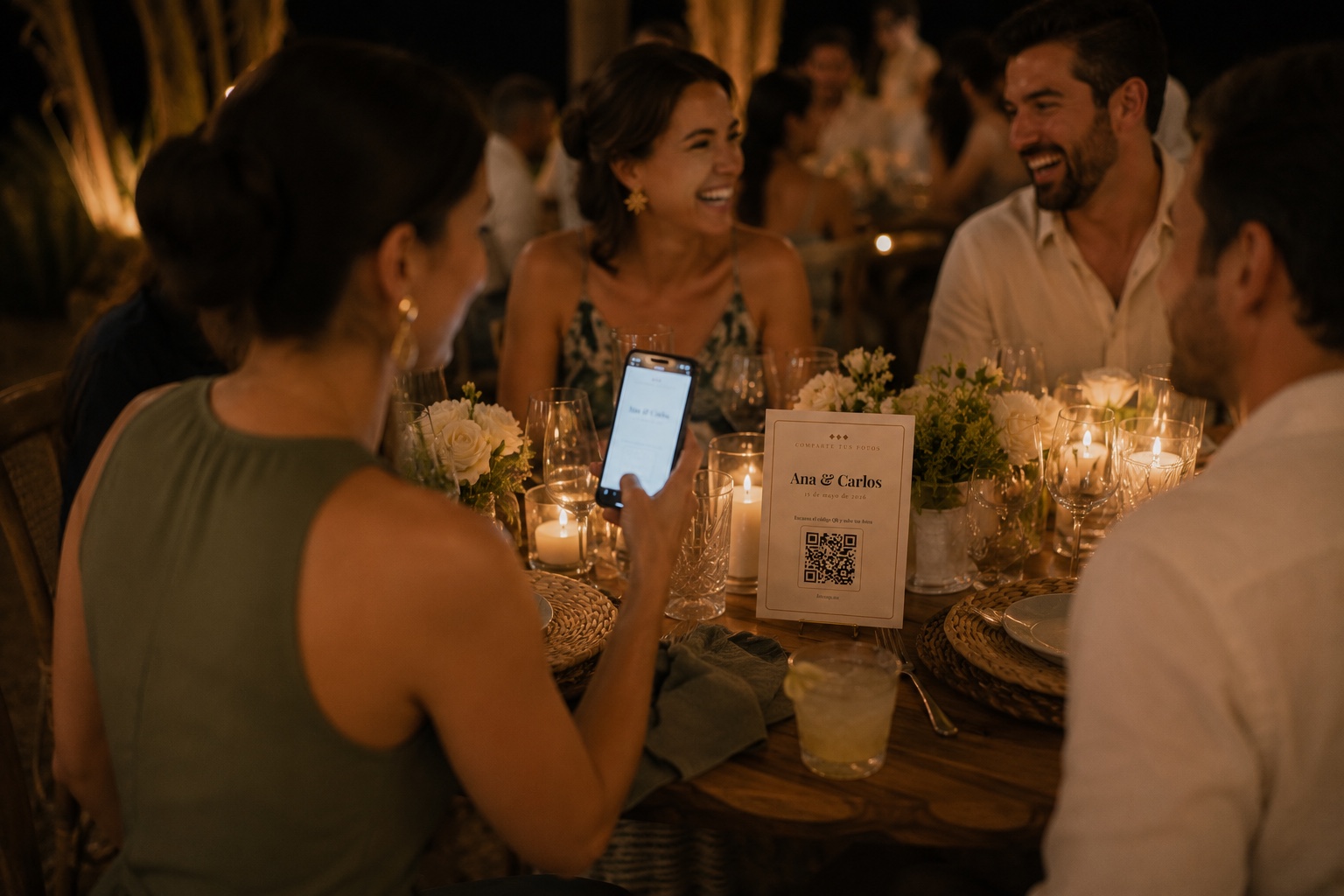
You generate a QR code linked to an upload page for your specific event. You print it on table cards, include it in the menu, or put it on a small sign at each seat. Guests scan it with their phone camera. The browser opens a page. They select photos from their gallery and upload. No app, no account, no password.
You receive the photos in a dashboard at original quality and download them as a ZIP file after the wedding. That's the complete flow.
What makes this work is that it uses the phone's existing browser instead of requiring a download. Every phone already has Safari or Chrome installed. Neither requires any setup. The guest scans the QR and they're immediately on the upload page. That's as close to zero friction as you can get at a social event.
Why most couples don't think to set this up
They assume the photographer will get everything. Or they plan to collect photos through WhatsApp and deal with the quality and organization problem later. Or they simply don't think about it until after the wedding, when it's too late.
Every wedding photographer, even excellent ones, covers a fraction of the moments happening simultaneously at a reception. One person cannot be in ten places. The toasts, the first dance, the cake cutting: documented. The table where four generations of your family happened to end up together, the last 20 minutes of the night, the dance floor moment your guests still talk about: often not.
A wedding photo QR code is the documentation layer for everything else. Not a replacement for the photographer. An extension of what one person can possibly capture.
Where to place the QR code
On the table at each seat. Not at the entrance. Not just at the bar. At the table, visible from where each guest sits during dinner.
This sounds obvious, but most guides suggest the entrance as a logical placement. The entrance is when guests are moving, still greeting people, still finding their tables. The table is when they're seated, relaxed, and the phone is already out. Those are two completely different environments for getting someone to do something.
Size matters too. A QR code smaller than 4x4 cm on a flat card is difficult to scan from normal table distance, especially for older guests. 5x5 cm is the practical minimum for reliable scanning across all phone models. If you're placing it at the center of the table rather than on individual cards, 8x8 cm or larger works better.
The one thing that drives participation more than anything else
Ask your emcee to mention the QR code during dinner. Verbally. With a microphone.
Not at the entrance. Not at the beginning of the reception. During dinner, when guests are seated and the phone is already on the table. "If you'd like to share your photos with the couple tonight, there's a QR code right on your table. Just scan and upload whatever you'd like to share." Two sentences. That's all it takes.
That announcement, in that moment, moves participation from under 10% to 30 or 40%. The same QR code placed identically, without the announcement, generates a fraction of the uploads. The barrier isn't the technology. It's the prompt to use it at exactly the right time.
The HEIC problem iPhone guests create without knowing it
iPhones since the iPhone 7 save photos in HEIC format by default. HEIC is efficient and high-quality, but Windows computers can't open HEIC files without additional software. If you receive 200 HEIC files in a ZIP, you may not be able to view them on your laptop without installing an extra codec.
A good wedding photo platform converts HEIC to JPEG automatically during upload. FotoZap does this before photos land in your dashboard. You don't need to ask guests to change their camera settings, which most people wouldn't know how to find anyway. The files you download open on any device without anything extra installed.
How long to keep the QR link active
At minimum, a week after the wedding. Two to three weeks is better.
A significant number of guest uploads happen the day after the wedding. Guests wake up, scroll through their camera roll, and realize they have photos worth sharing. If the link is already expired, those photos are gone. If it's still active and you sent a morning-after reminder to the group chat, those uploads come in throughout the day.
That reminder message is the second most important thing you can do, right after setting up the system in the first place. "We set up a way to collect everyone's photos from last night, here's the link." Sent when people are reviewing their photos over breakfast, it generates more uploads in some cases than the QR code at the wedding itself.
What to do with 500 photos
Download the ZIP. You'll have hundreds of photos of varying quality: some excellent, some blurry, some duplicates of the same moment from different angles.
Make one small selection, 20 to 30 photos, for sharing with family right away. Keep the full archive untouched. The photos that seem unremarkable right now may be exactly what you're looking for in five years. Storage is cheap. Deletion decisions are permanent.
The professional photographer's album is curated, beautiful, and complete for the planned moments. The guest photo archive is chaotic, occasionally brilliant, and irreplaceable for everything unplanned. Set up the QR code for wedding photos. Mention it during dinner. Send the reminder the next morning. You'll have both versions of your wedding.